

Introduction: The Myth of “Publish and Pray”
In the early days of the blogosphere, the digital landscape was much like the Wild West. You could publish a 300-word update about your day, sprinkle in a few keywords, and find yourself on the first page of Google within hours. Today, the internet is home to over 1.9 billion websites. Every second, roughly 90,000 searches are performed on Google
When I started my blogging journey, I operated under a dangerous misconception: “If I write it, they will come.” I spent weeks crafting what I believed were masterpieces. I agonized over the prose, used high-resolution images, and ensured my grammar was flawless. Yet, when I checked my analytics, the numbers were devastating. Zero visitors. Zero clicks. It felt like I was shouting into a void.
The reality I eventually discovered is that Google is not a human reader—it is an algorithm. It doesn’t rank “good” writing; it ranks relevant solutions. To get approved for AdSense and build a sustainable income, you must stop being just a writer and start being a content strategist. This 3,000-word guide is the result of years of trial, error, and eventual success.
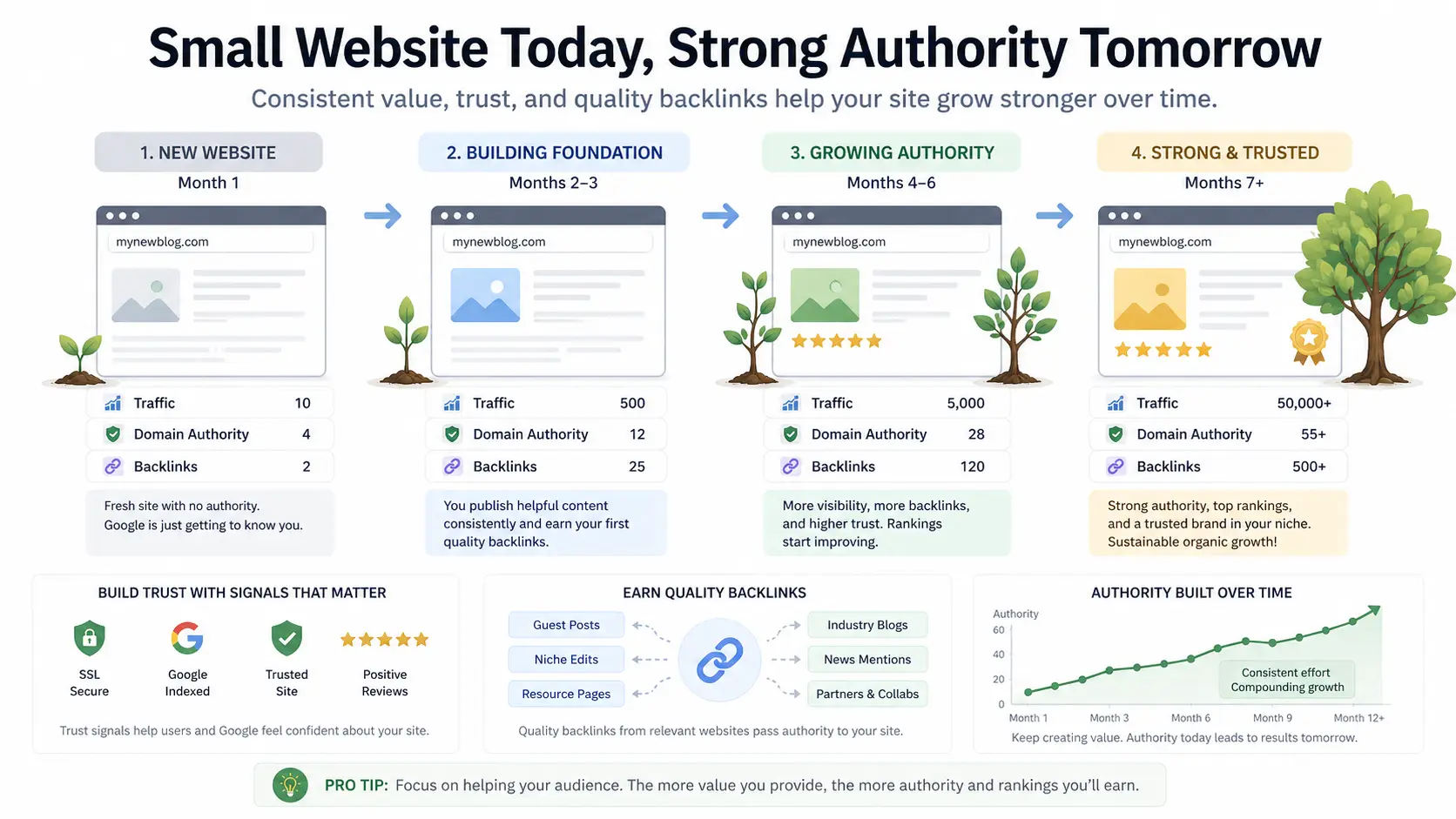
Step 1: Understanding the “Google Sandbox” and Website Authority
Before diving into your specific mistakes, we must address the Elephant in the Room: the age of your domain.
What is the Google Sandbox?
While Google has never officially confirmed its existence, the SEO community widely recognizes a “Sandbox” effect. This is a period (usually 3 to 8 months) where Google “tests” a new website. During this time, even if you write the best article in the world, you may struggle to rank on page one.
Why does Google do this?
-
To Filter Spammers: New sites appear and disappear every day. Google wants to see if you are committed.
-
To Build Trust: Just like a bank won’t give a loan to someone without a credit history, Google won’t give traffic to a site without a “trust history.”
How to Build Authority Early
If your blog is under six months old, focus on E-E-A-T: Experience, Expertise, Authoritativeness, and Trustworthiness.
-
Experience: Show that you have actually used the products or lived the situations you write about.
-
Expertise: Use professional terminology and cite your sources.
-
Authoritativeness: Stick to one niche. If you write about “Gardening” one day and “Crypto” the next, Google will never view you as an authority in either.
Step 2: The Keyword Research Revolution
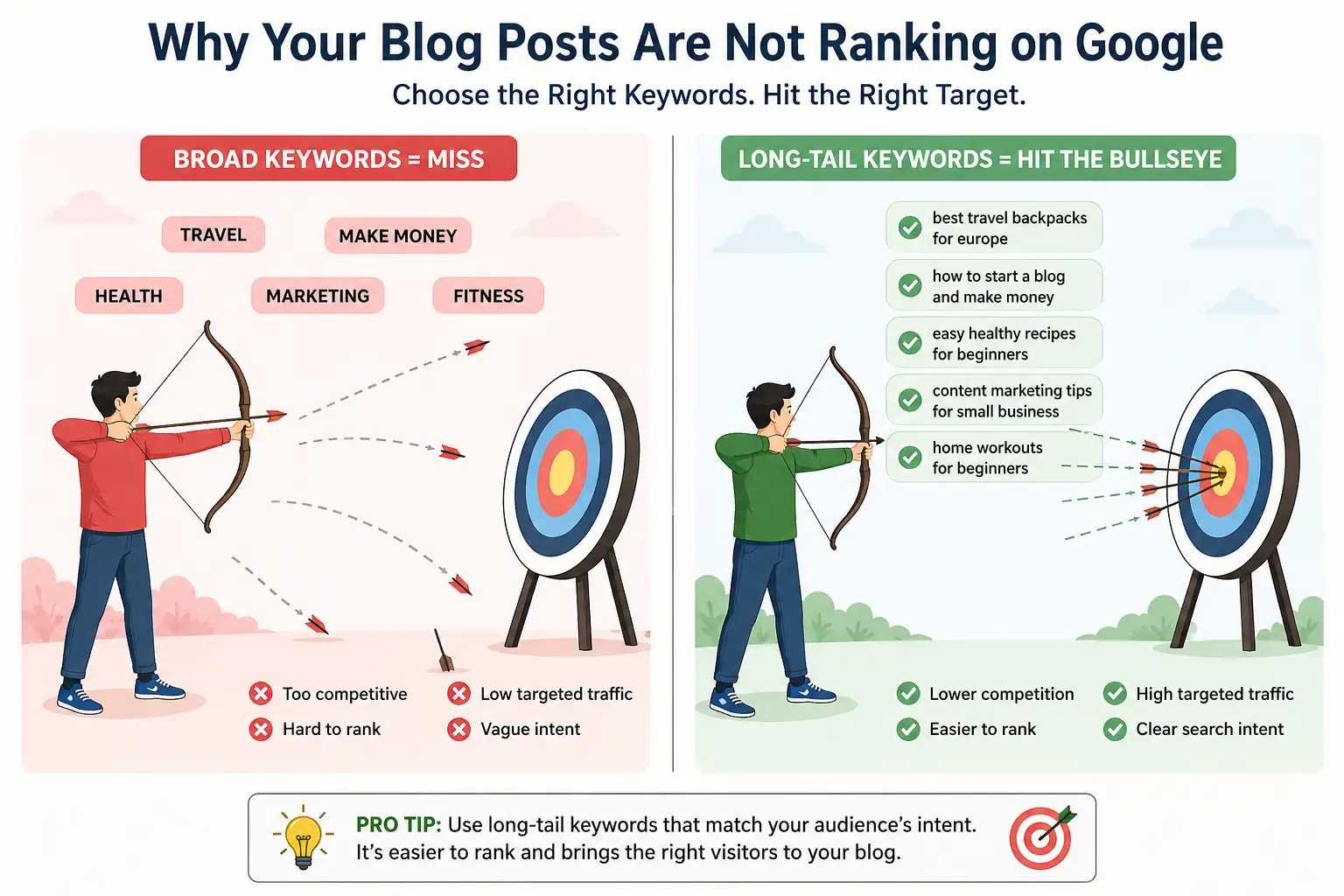
My biggest mistake was targeting “Head Keywords.” I wanted to rank for “Make Money Online.” I didn’t realize I was competing against Forbes, Business Insider, and Entrepreneur.
The Power of Long-Tail Keywords
A “Head Keyword” is a broad term like Shoes. A “Long-Tail Keyword” is Best waterproof trail running shoes for wide feet.
Why Long-Tail Keywords are your secret weapon:
-
Lower Competition: Big sites don’t always target these specific phrases.
-
Higher Conversion: Someone searching for “SEO” might just be curious. Someone searching for “How to fix 404 errors on WordPress” has a specific problem they need solved now.
My Step-by-Step Keyword Strategy
-
Seed Idea: Start with a broad topic.
-
Google Autocomplete: Type your topic into Google but don’t hit enter. See what Google suggests. These are real searches happening right now.
-
Related Searches: Scroll to the bottom of the search results page. The “Searches related to…” section is a goldmine for sub-headings.
-
Keyword Difficulty (KD): Use tools like Ahrefs, SEMrush, or free alternatives like Ubersuggest. Look for keywords with a difficulty score of under 20 if your blog is new.
Step 3: Solving the “Thin Content” Crisis
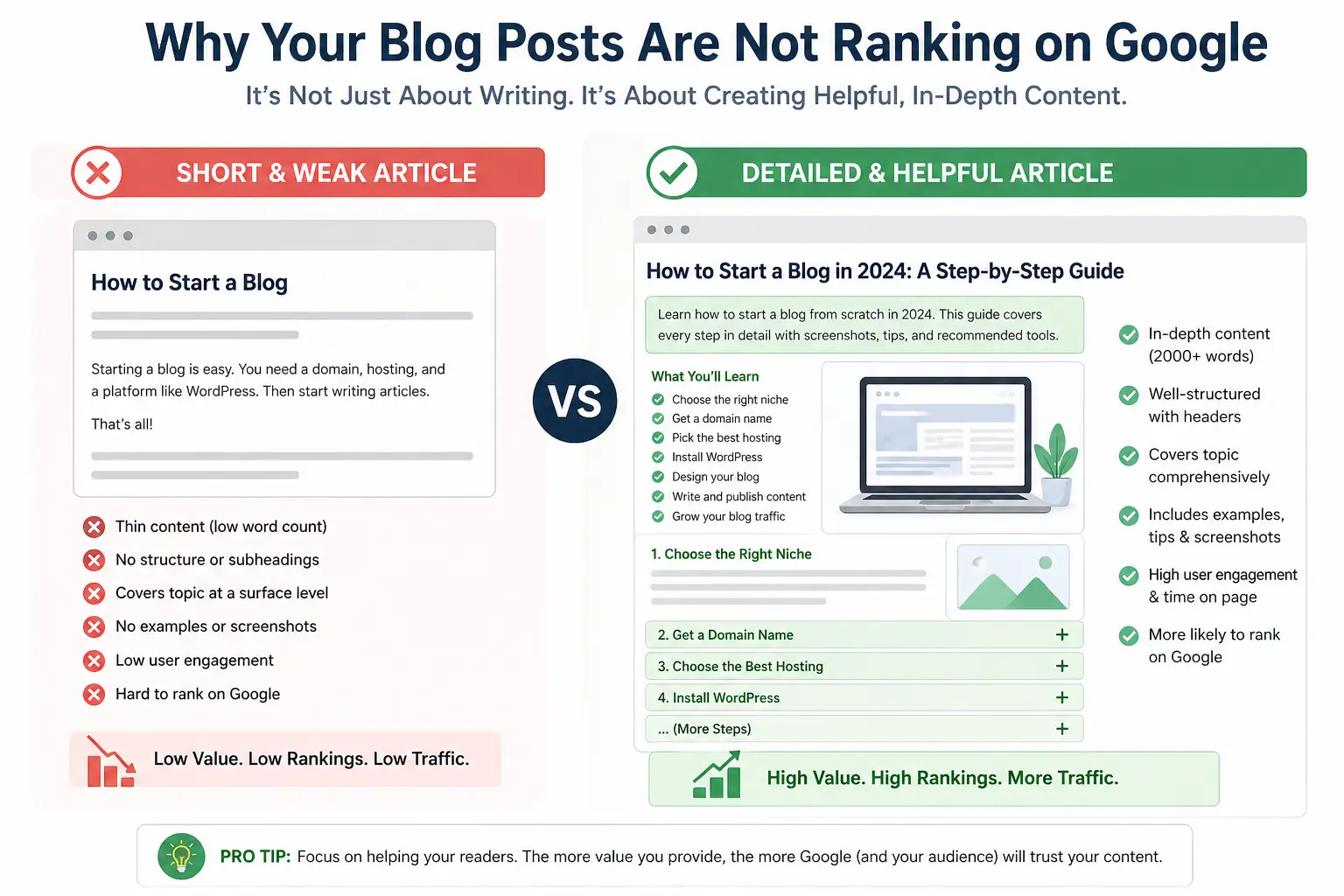
Google’s “Helpful Content Update” changed everything. It penalized sites that provide surface-level information.
What is Thin Content?
Thin content isn’t just about word count. An 800-word article can be high quality, and a 3,000-word article can be thin if it’s full of “fluff.” Thin content is content that:
-
Fails to answer the user’s question fully.
-
Regurgitates exactly what is on the first three results of Google without adding new value.
-
Is clearly written by AI without human editing or unique insight.
How to Add “Weight” to Your Content
To ensure your content is “Thick” and valuable:
-
Add Personal Case Studies: “Here is what happened when I tried this…”
-
Include Expert Quotes: Reach out to others in your niche for a one-sentence opinion.
-
Use Data and Statistics: Don’t just say “Blogging is popular.” Say “According to DemandMetric, 70% of people rather learn about a company through articles than an advert.”
-
Create Custom Graphics: A simple chart or infographic can keep a user on your page for an extra 60 seconds, which signals quality to Google.
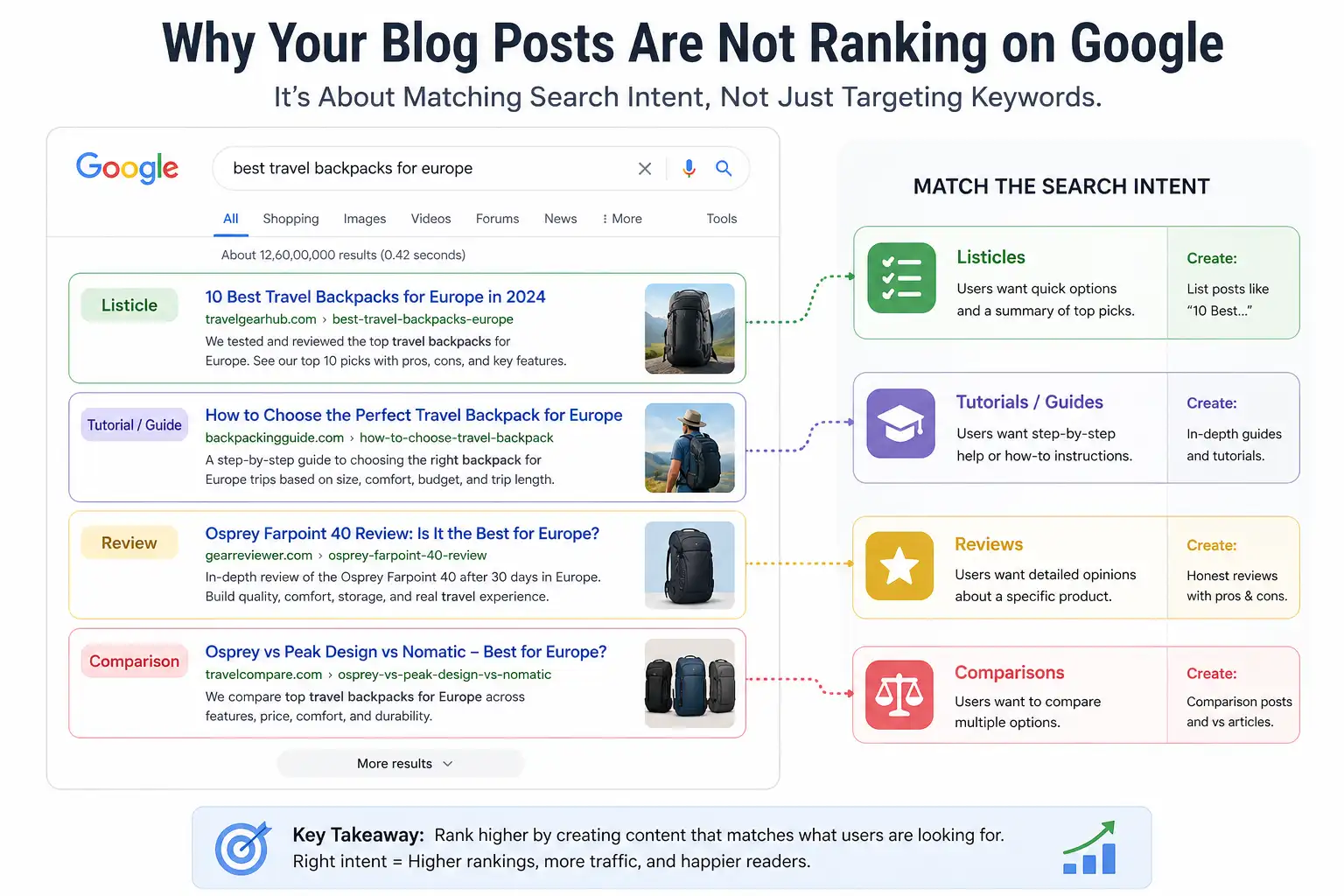
Step 4: Decoding Search Intent
I once wrote a beautiful article titled “The History of Laptops” and tried to rank it for the keyword “Best Laptops 2024.” It failed miserably. Why? Because the Search Intent was wrong.
The Four Types of Search Intent
-
Informational: The user wants to learn (e.g., “What is SEO?”).
-
Navigational: The user wants to find a specific site (e.g., “Facebook login”).
-
Commercial: The user is researching before a purchase (e.g., “iPhone 15 vs Samsung S24”).
-
Transactional: The user is ready to buy (e.g., “Buy cheap domain name”).
The Fix: Before you write a single word, search your keyword. If the top 10 results are all product reviews, don’t try to rank an informational “How-to” guide. You must give the audience what they are already looking for.
Step 5: Technical SEO and On-Page Optimization
You can have the best content in the world, but if Google’s “spiders” (bots) can’t read your site, you will never rank.
The Technical Foundation
-
Site Speed: Use Google PageSpeed Insights. If your site takes more than 3 seconds to load, 40% of users will leave. AdSense also prefers fast sites as it ensures their ads are actually seen.
-
Mobile Responsiveness: Over 60% of searches happen on mobile. If your text is too small or buttons are too close together, Google will penalize you.
-
HTTPS: Ensure you have an SSL certificate. Google flags “Not Secure” sites, which destroys user trust.
On-Page Mastery
Every post should follow this structural “Skeleton”:
-
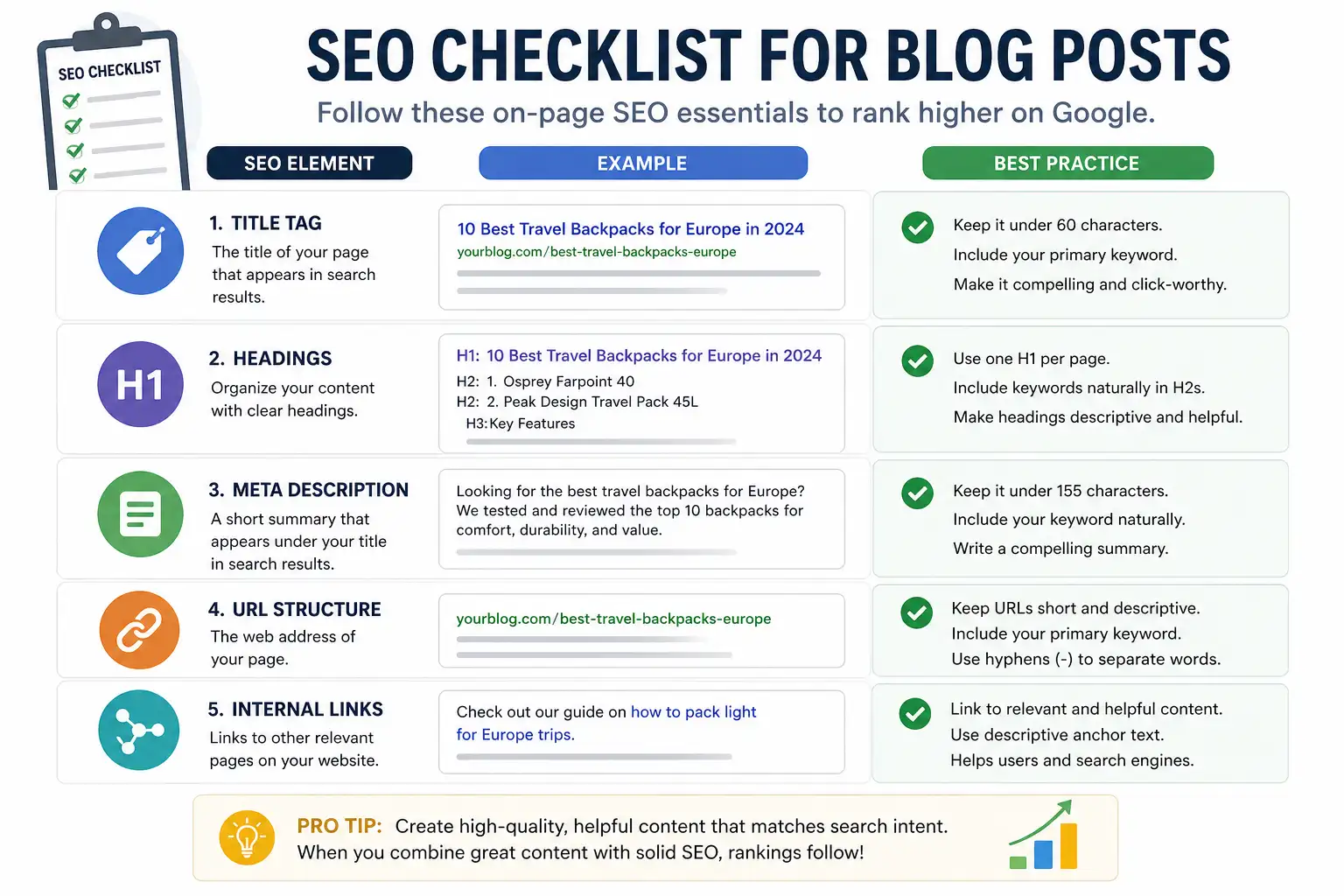
H1 Tag: Only one per page. It should contain your primary keyword.
-
H2/H3 Tags: Break up your text every 200–300 words. Use these headers to include “LSI Keywords” (words related to your main topic).
-
URL Structure: Keep it short. yourblog.com/fix-blog-ranking is better than yourblog.com/p=123-how-to-fix-blog-ranking-2024.
-
Image Alt Text: Google cannot “see” images. You must describe them in the Alt Text field so the algorithm knows what they represent.
Step 6: The “Freshness” Factor (Updating Old Posts)
Most bloggers believe their job ends when they hit “Publish.” In reality, that is only 50% of the work. Google loves “Fresh” content.
The Decay of Content
Over time, your rankings will naturally drop. Links break, images stop loading, and facts change.
My Update Strategy:
-
Audit every 3 months: Identify posts that have dropped from Page 1 to Page 2.
-
Update the Year: If your title is “Best SEO Tips 2023,” update it to 2024 (and actually update the content!).
-
Add Internal Links: Link your new posts to your old ones. This passes “Link Juice” throughout your site.
Step 7: User Experience (UX) and “Dwell Time”
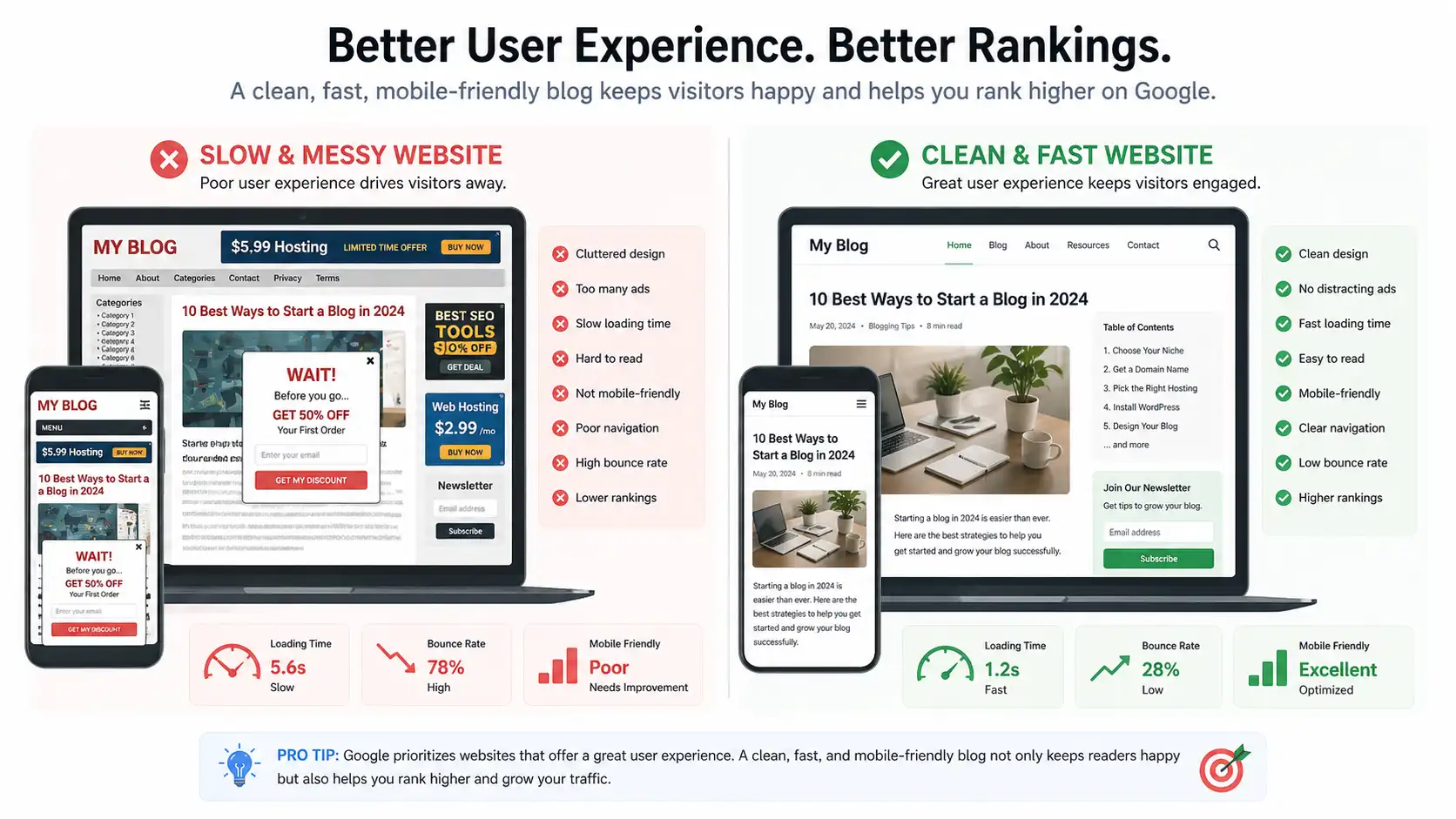
“Dwell Time” is the amount of time a user spends on your page before clicking back to the search results. If your Dwell Time is low, Google assumes your content is bad.
Improving UX for AdSense Approval
Google AdSense cares deeply about UX because advertisers want their ads on “clean” sites.
-
White Space: Use short paragraphs (2–3 sentences). Massive walls of text scare readers away.
-
Font Choice: Use sans-serif fonts (like Arial or Roboto) at a minimum size of 16px.
-
Avoid “Ad Density” Issues: Don’t crowd your content with too many pop-ups or banners. It makes your site look like spam.
Step 8: The Promotion Engine
If you have a new blog, you cannot rely solely on SEO. You need to “force” traffic to your site to show Google that people like your content.
Where to Promote
-
Pinterest: This is a visual search engine. One “Viral Pin” can bring 10,000 visitors in a day.
-
Niche Forums: Join Quora or Reddit. Don’t just spam your link. Answer a question thoroughly and then say, “I wrote a more detailed guide on this here if you’re interested.”
-
Email Marketing: Start a list on day one. Your email subscribers are your most loyal readers and provide a “traffic floor” every time you publish.
Step 9: The Psychological Game of Blogging
Blogging is 10% writing and 90% persistence. Many people quit right before their “hockey stick” growth begins.
Why You Shouldn’t Compare Your Chapter 1 to Someone Else’s Chapter 20
You are competing against sites that have 50 employees and $100,000 monthly budgets. You cannot out-spend them, but you can out-niche them.
The 6-Month Rule: Commit to publishing two high-quality, 1,500+ word articles per week for six months without looking at your stats. This prevents the “Analytics Despair” that causes most bloggers to quit.
Conclusion: Turning Information into Action
Ranking on Google is not a mystery or a matter of luck. It is a repeatable science. To get your blog approved for AdSense and ranking on page one, you must:
-
Stop writing for yourself and start writing for the user’s intent.
-
Master the technical basics so Google can find you.
-
Provide more value than anyone else on the first page.
-
Be patient. Trust is built in drops but lost in buckets.
The journey from zero visitors to a profitable blog is long, but it is one of the most rewarding paths you can take. Every expert was once a beginner who refused to quit. Fix your mistakes, update your strategy, and keep publishing. Your breakthrough is closer than you think.
Frequently Asked Questions
1. How long should a blog post be for SEO?
While there is no “magic number,” studies show that the average length of a Page 1 result is around 1,447 words. For competitive topics, aim for 2,000+.
2. Can I use AI to write my blog posts?
You can use AI to outline and brainstorm, but if you want AdSense approval and Google rankings, you must add “Human Value.” Google’s algorithms are increasingly good at detecting unedited AI content that adds no new insight.
3. What is the most important SEO factor?
Search Intent. If you don’t answer the user’s question, no amount of technical SEO or backlinks will save your ranking.
4. How many keywords should I use for improve Google ranking?
Avoid “Keyword Stuffing.” Use your focus keyword in the title, the first paragraph, a few subheaders, and the conclusion. Let the rest happen naturally.
5. How do I get my first backlink?
The best way is “Guest Posting.” Write a high-quality article for another blog in your niche and include a link back to your site in the author bio.
6. Does social media traffic help SEO?
Indirectly, yes. It brings users to your site, increases brand awareness, and can lead to natural backlinks from people who discover your content on social platforms.